How it works
One shot. A clear path to the next person.
Add selected work, keep its versions and decisions together, and share the context a review or revision needs.
30 days of Team features with 100 GB trial storage. No card or automatic renewal. See trial terms
The workflow
Selected work. Connected versions. A clear handoff.
Follow one shot through the actual product. Add the work you want to keep, record the decisions and give the next person the view they need.
Step 01
Add the shot. Review the context.
Upload selected work in BTW, or use the optional browser extension alongside your AI tool. Check the available details and add the prompt, model and references you want to keep.
- Choose the asset and its project
- Review available details and fill in missing context
- The extension saves what you explicitly add
Extension · Selected work Add the file and review its context before saving to the project. Step 02
Connect the versions that belong to the shot.
Organize related iterations on the canvas. Keep each version with its own saved inputs, references and notes so the creative direction remains easy to follow.
- Link selected iterations to their parent shot
- Keep the saved prompt and references with each version
- Follow the recorded sequence when the work comes back
Workflow · Related versions 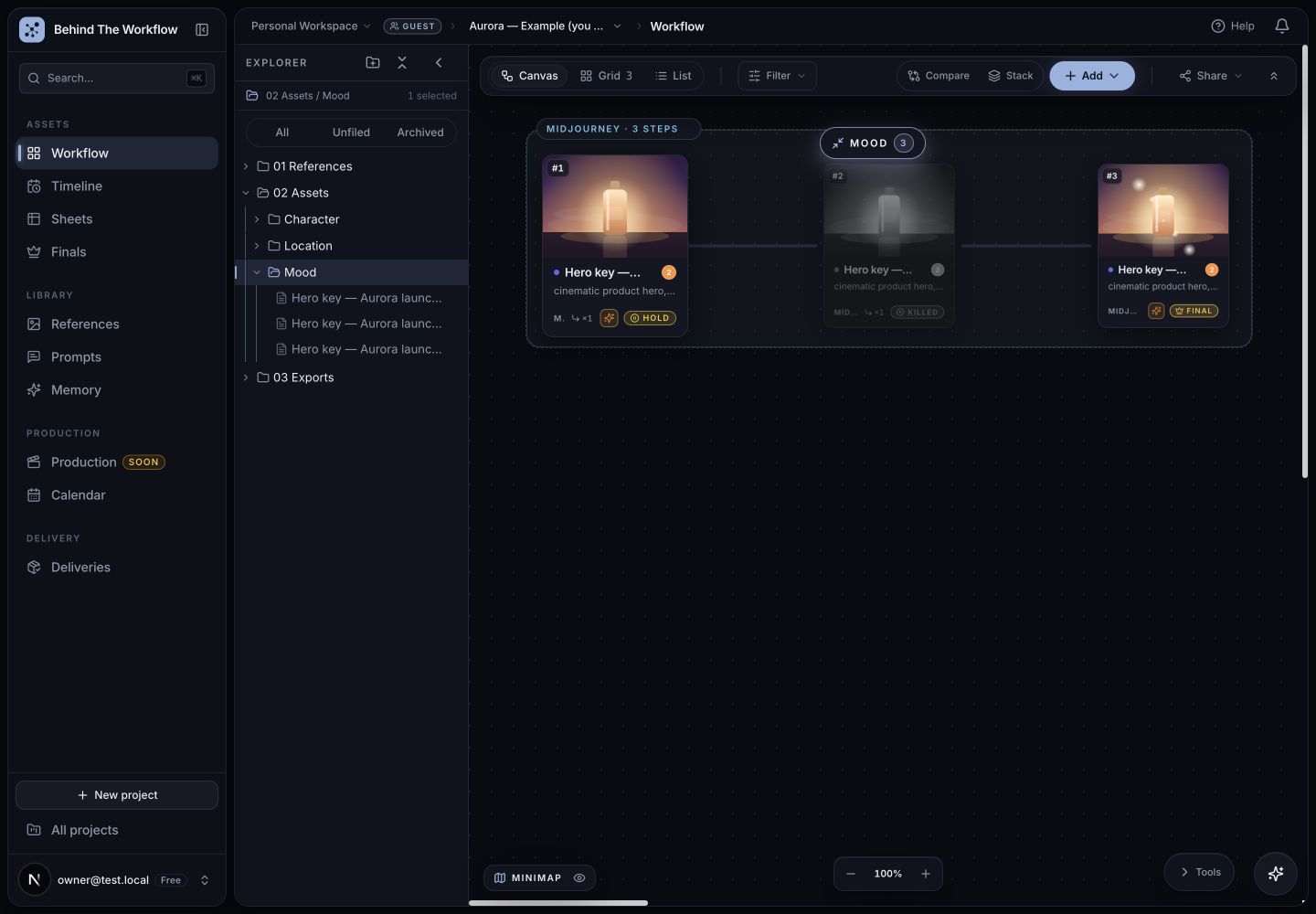
Connected versions keep the selected work and its alternatives in view. Step 03
Make the selection clear. Keep the reason.
Mark the chosen version final. Use hold or kill for the alternatives where useful, and add the review note that explains the decision.
- Identify the version the team wants to continue or deliver
- Keep the reason for the selection beside the work
- Recorded decisions have an author and time
Asset detail · Selection and context 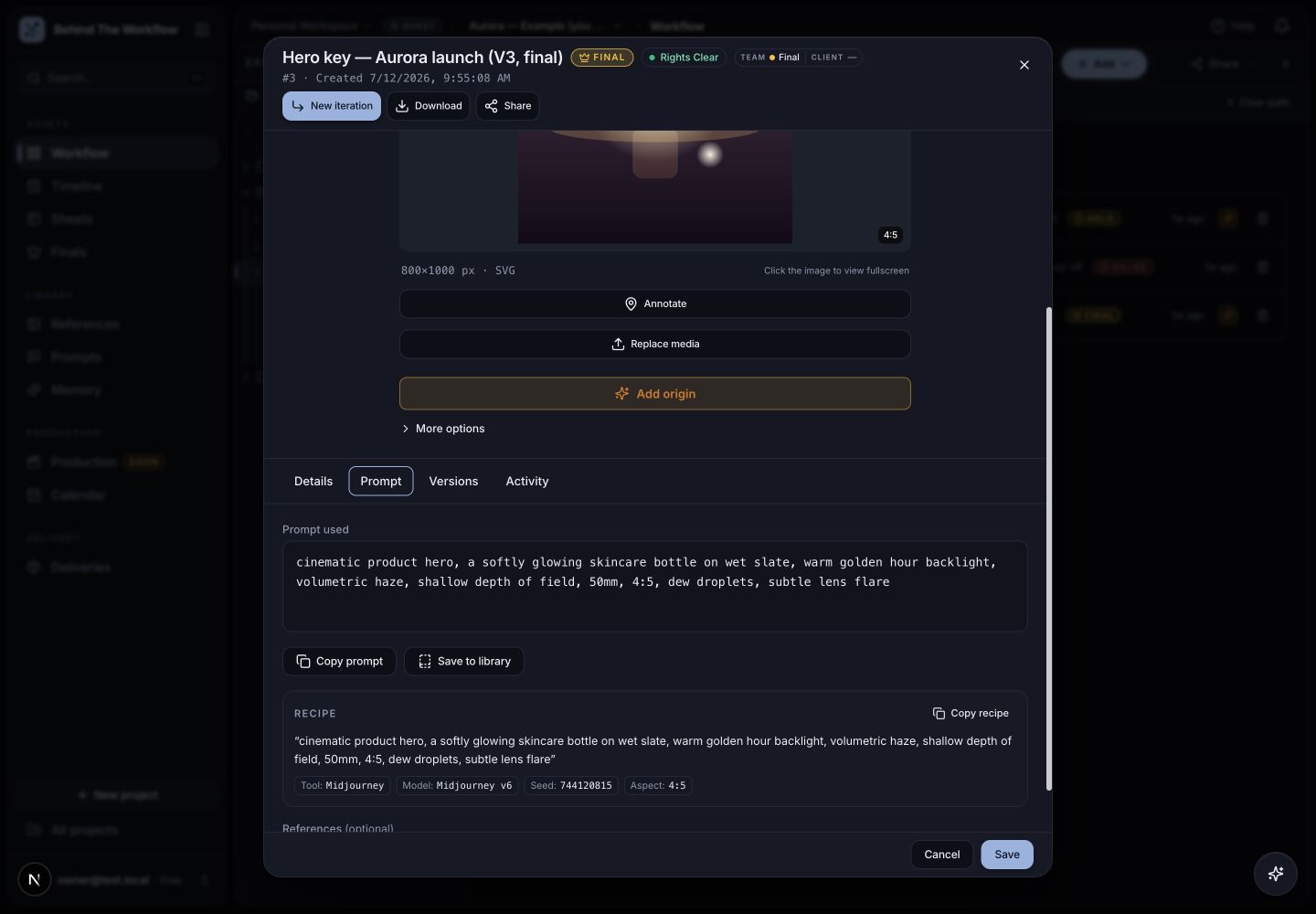
Open the selected asset to inspect the production information kept with it. Step 04
Give the next person the right view.
Share the selected asset or project view with the context needed for the next review. Check which versions and details are visible and whether downloads are allowed.
- Choose the scope and permissions before sending
- Preview the view the recipient will use
- Ask whether they can find the final and follow the decision
Handoff · Shared view Choose what the next person sees when they open the link.
Optional browser extension
Keep the capture step close to the work.
Choose an asset while you are in the browser, review the details you want to retain and add it to the right project. The extension is one way in; you can also add work directly in BTW.
The production record
The details that make a shot understandable.
Keep the details relevant to this production. The record reflects what you save; the shared view reflects the scope and permissions you choose.
- Prompt
- The text you save with the asset.
- Tool and model
- The generator and model details you provide.
- Seed and aspect
- Available settings worth keeping for future work.
- References
- Linked reference material and the rights information you record.
- Versions
- The related iterations you organize around the shot.
- Decision
- The recorded final, hold or kill choice.
- Author and time
- Who recorded the work or decision in BTW, and when.
- Comments
- Feedback kept with the work it refers to.
FAQ
Before your first project
- What is Behind The Workflow?
- BTW is AI asset management for creative teams. Organize selected images and videos with prompts, models, references, versions and review decisions in a shared project, from exploration to client handoff.
- What do I have to add myself?
- You choose which assets to save and review their production details. Add missing prompts, model details or references that matter to the work. The optional browser extension saves what you explicitly add; it does not continuously monitor your AI platforms.
- Is this another place to store the same files?
- BTW connects the file to its related versions, generation context and review decisions. That gives the next person a starting point for a revision or handoff. Try one shot: find the final, open its references and follow the reason it was chosen.
- Can I bring in generations I have already made?
- Yes. Connect a supported account to browse and import existing generations. Magnific and Higgsfield have dedicated file views in project integrations. Select the work to import, then review the available details and complete the context your project needs. You can also upload files or add selected work with the browser extension.
- Does BTW connect to After Effects or Premiere?
- BTW is a separate workspace for assets and production context. It does not currently synchronize an After Effects or Premiere timeline. You can add selected exports and record the details that matter to a review or handoff.
- Who gets the most from BTW?
- Artists, producers and creative teams who revisit AI work, review it together or hand it to another person. BTW is the best place to keep the selected asset, its production context and the decision behind it connected across those steps.
- Does a saved prompt guarantee the same result again?
- No. A prompt, model, seed and references can help explain the recorded approach, but they do not guarantee an identical output. Available settings and behavior differ between tools and model versions.
- What can a client see?
- It depends on the view, scope and permissions you share. Review those settings before sending an asset or project link. Client Space, review and delivery features support the handoff; internal context does not all have to go to every recipient.
- Does BTW guarantee compliance?
- No. It helps organize the inputs, human decisions and approvals you record for client and relevant disclosure questions. The saved record does not by itself certify rights, accuracy or legal compliance.
- How should I start?
- Create an account and try one real shot. New accounts start with 30 days on the Team plan, no card. Add selected versions, the relevant context and a decision; ask the next person to work from it. If you work alone, revisit it yourself later.
Your first real test
Try a shot the next person needs to understand.
Add its selected versions, relevant references and the reason for your choice. Share the intended view. Can someone pick up the work from that record? If you work alone, reopen it yourself later.
30 days of Team features with 100 GB trial storage. No card or automatic renewal.